Animation production involves multiple stages before reaching the polished final product. Among these phases, animatics play a crucial yet often misunderstood role. Many people confuse animatics with finished animation, but they serve entirely different purposes in the creative workflow.
At Split Arts Technologies, we use animatics extensively in our pre-production process. This planning stage saves clients significant time and money. Understanding the distinction between animatics and full animation helps you appreciate each stage’s value.
Animatic vs Animation: Which One Should You Choose for Your Project?
When it comes to Animatic vs Animation, the right choice depends on your project’s goals, budget, and complexity. Animatics are ideal during the planning stage, helping you visualize story flow, timing, and scene structure without investing heavy resources. They act as a cost-effective blueprint, allowing quick revisions and better decision-making before production begins.
On the other hand, animation is the final output meant for your audience. It delivers polished visuals, smooth motion, and engaging storytelling that represents your brand or message professionally. While animation requires more time and budget, it’s essential for creating a high-quality viewing experience.
In most cases, animatics and animation are not competitors but complementary stages. Starting with an animatic ensures a smoother animation process, reduces costly errors, and results in a more refined final product.
What is an Animatic?
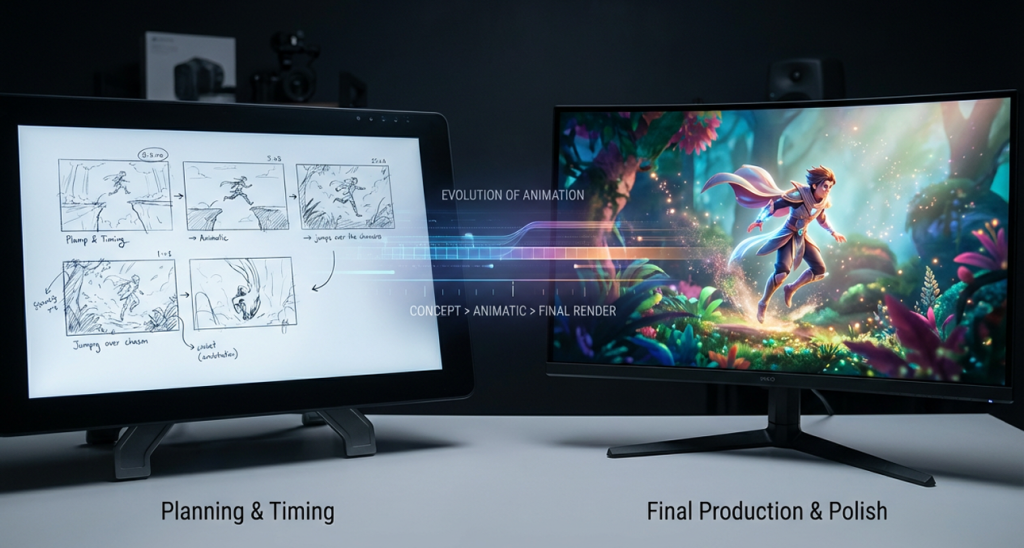
An animatic is essentially a moving storyboard. It combines static illustrations or rough sketches with timing, sound, and basic transitions. Think of it as a blueprint that maps out the entire animation before detailed work begins.
The visuals remain simple intentionally. Quick sketches or even stick figures suffice because the purpose is testing story flow and timing. Audio might include temporary voice-over, placeholder music, and rough sound effects.
Animatics let teams preview the final animation’s pacing and structure. Directors can spot pacing problems, awkward transitions, or story gaps early. Making changes at this stage costs far less than after animation production starts.
Full Animation Production
Full animation represents the finished, polished product viewers see. Every frame is carefully crafted, colored, and rendered. Characters move smoothly, backgrounds show rich detail, and effects enhance the storytelling.
Production quality varies by style. 2D animation involves drawing or digitally creating each frame. 3D animation requires modeling, rigging, texturing, and rendering assets. Both demand significant time investment and technical skill.
The animation stage is where artistic vision becomes reality. Subtle movements, facial expressions, and environmental details bring stories to life. This refinement separates amateur work from professional-grade animation.
Key Differences Between Animatic and Animation
Visual Fidelity
The visual fidelity gap is immediately obvious. Animatics use rough sketches; animations feature polished artwork. This difference reflects their purposes planning versus presentation.
Timing Precision
Timing precision differs significantly too. Animatics establish approximate pacing that animation refines frame by frame. The animatic might show a character walking for three seconds; the animation determines exactly how many steps occur.
Cost and Time Investment
Cost and time investment separate them drastically. An animatic takes days to produce. Full animation of the same sequence requires weeks or months. This efficiency makes animatics invaluable for testing ideas before committing resources.
Animatic vs Full Animation: Key Differences
| Feature | Animatic | Full Animation |
|---|---|---|
| Visual Fidelity | Rough sketches or stick figures | Polished, detailed artwork |
| Purpose | Planning and testing story flow and timing | Final presentation of the story |
| Timing Precision | Approximate timing | Frame-by-frame precise timing |
| Production Time | Takes days to produce | Takes weeks or months |
| Cost | Relatively low cost due to simplicity | High cost due to detailed animation work |
| Level of Detail | Basic, minimal detail (just enough to communicate the idea) | Highly detailed, with refined movements and effects |
| Usage | Used for testing pacing, structure, and story flow | Final product for viewing |
| Editing Flexibility | Easy and inexpensive to revise | Difficult and expensive to make changes after production |
| Technical Requirements | Basic skills in drawing and storyboarding | Advanced animation skills in 2D or 3D animation |
| Feedback | Easily shown to clients or stakeholders for feedback | Usually presented after the production is complete |
How Animatics Help in Animation Creation
Animatics function as communication tools between stakeholders. Clients see their video’s structure before expensive animation begins. This preview prevents misaligned expectations and costly revisions later.
Testing story flow reveals problems invisible in static storyboards. A sequence might look good on paper but feel rushed or dragged out in motion. The animatic catches these issues early.
We insist on animatic approval before starting animation. This checkpoint ensures everyone agrees on direction. Changes at this stage are quick and inexpensive compared to mid-animation adjustments.
The Animation Workflow Explained
Professional animation follows a structured process:
- Development: Concept and script.
- Storyboarding: Visualizes the script scene by scene.
- Animatic: Adds timing and basic motion to those storyboards.
- Animation: Begins only after animatic approval, where final artwork is created, movements animated, and details refined.
- Post-production: Adds final sound design, music, and color correction.
Each phase builds on the previous one. Skipping the animatic stage is tempting for budget reasons but usually backfires. The cost of fixing story problems during animation far exceeds animatic production expenses.
Benefits of Using Animatics
Budget Control
Budget control improves dramatically with animatics. You identify and solve problems when changes cost hundreds instead of thousands. This risk reduction makes project budgets more predictable.
Client Confidence
Client confidence increases when they see animatics. Abstract scripts become tangible previews. Stakeholders understand what they’re approving, reducing anxiety and second-guessing.
Creative Teams’ Clarity
Creative teams benefit too. The animatic serves as a detailed roadmap for animators. Questions about timing, transitions, and scene composition are answered before animation starts. This clarity accelerates production.
Pre-Production Animatics in Professional Studios
Major animation studios treat animatics as essential, not optional. Studios like Pixar, Disney, and other industry leaders spend months refining animatics. They test story beats, joke timing, and emotional pacing exhaustively.
These studios understand that story problems cost exponentially more to fix later. An hour spent perfecting the animatic saves weeks of animation rework. The math becomes obvious at scale.
Perhaps more importantly, animatics enable creative risk-taking. Teams can test experimental ideas cheaply. If something doesn’t work, it’s easily changed. This freedom to experiment often leads to breakthrough creative solutions.
Animation Testing and Revision Process
Animatics facilitate structured feedback. Show the rough version to test audiences or focus groups. Their reactions guide refinements before significant animation investment occurs.
Timing adjustments happen easily in animatic form. Extend a pause for comedic effect or quicken action sequences these changes take minutes. The same revisions after animation might require days of rework.
Version control becomes manageable with animatics. Test multiple approaches to key scenes. Compare them side by side. Choose the strongest option before committing to full production.
Different Types of Animatics
- Basic Animatics: Use still images with simple transitions. These work well for straightforward narratives where motion complexity doesn’t affect story comprehension.
- Advanced Animatics: Include rough animation for complex action sequences. Camera moves, character blocking, and special effects get basic representation. This additional detail helps preview technically challenging scenes.
- Interactive Animatics: These are emerging in virtual production, allowing directors to explore scenes from different angles in real-time. The technology bridges animatics and final animation more seamlessly.
Animation Phases Beyond Animatics
Layout
After animatic approval, artists define final scene compositions, including camera positions, character placements, and background details.
Rough Animation
Animators create simplified versions of final designs, focusing on movement quality rather than visual polish.
Final Animation
This stage adds all details, effects, and polish. Rendering (for 3D) or cleanup and coloring (for 2D) follows, leading to post-production.
When Animatics Are Essential
- Complex narratives absolutely require animatics. Stories with multiple plot threads, flashbacks, or intricate timing need this planning phase.
- High-budget projects can’t afford story mistakes. When thousands of dollars ride on each production day, animatics provide insurance against costly errors.
- Client-facing projects benefit immensely from animatics. External stakeholders need concrete previews to approve direction.
When to Skip Straight to Animation
Very simple animations might not need full animatics. A basic logo reveal or straightforward product demonstration has minimal story complexity. The storyboard might suffice for planning.
Experienced teams working on familiar formats sometimes streamline processes. If you’ve created dozens of similar videos, your workflow efficiency might justify skipping steps. However, this requires genuine expertise.
At Split Arts Technologies, we rarely recommend skipping animatics entirely. Even simple projects benefit from timing visualization. The time saved during animation almost always exceeds the animatic production time.
Making the Right Choice for Your Project
Evaluate your project’s complexity honestly. Multiple scenes, characters, or story beats indicate animatic necessity. Single-scene, simple animations might proceed directly to production.
Consider stakeholder approval requirements too. If multiple people need sign-off, animatics prevent miscommunication. They create concrete discussion points rather than abstract concepts.
The budget ultimately influences every decision. Ironically, tight budgets benefit most from animatics because they prevent expensive mistakes. Think of animatics as insurance against budget overruns.
Frequently Asked Questions (FAQ)
1. What’s the difference between animatics and animation?
Animatics are rough, low-fidelity previews of animations used for planning. They use simple visuals, timing, and sound, while animation refers to the final, polished product.
2. Why are animatics important in animation production?
Animatics help identify pacing, story issues, and structural problems early on, saving both time and money. They act as a blueprint, making the final animation smoother and more efficient.
3. How long does it take to create an animatic?
An animatic can take anywhere from a few days to a week depending on complexity. In contrast, full animation can take several weeks or months.
4. Can I skip the animatic stage in my project?
For very simple animations, you may not need an animatic. However, for more complex narratives or high-budget projects, animatics are invaluable in preventing costly mistakes.
5. How do animatics improve the animation process?
Animatics allow for testing story flow, timing, and transitions before starting full animation. They give teams a clear direction and help avoid revisions during the animation stage.