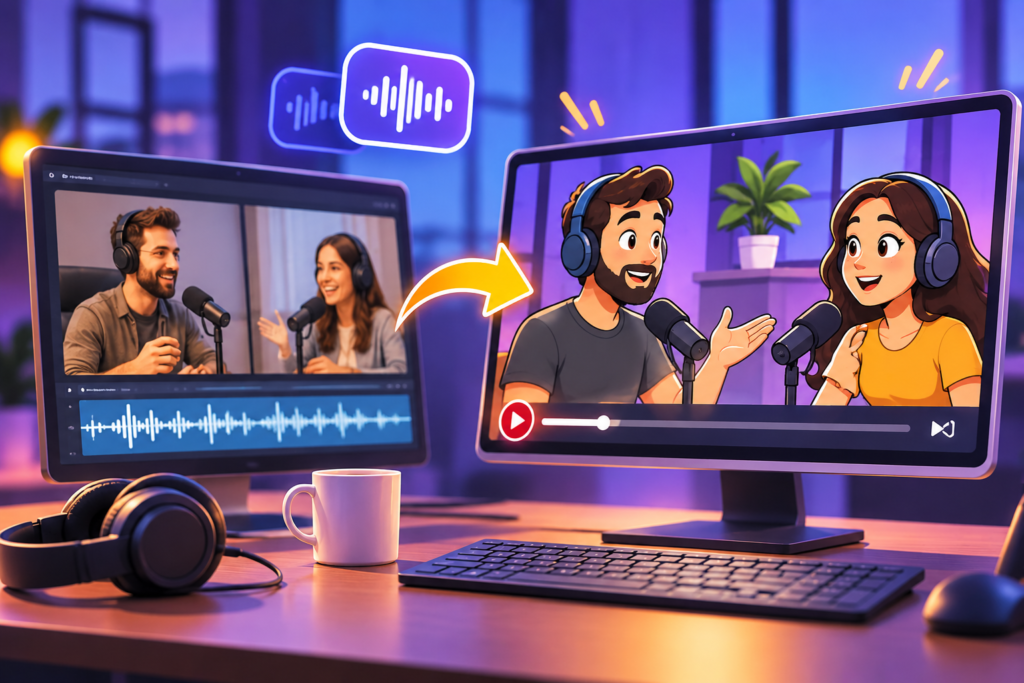
A podcast may contain one remarkable sentence buried inside a forty-minute conversation. However, the good thing is that animation can give that sentence a second life, i.e Visuals. It helps it travel through video-first feeds without losing its meaning. The trick is not to make things fancy but a thought worth sharing, and preserve the speaker’s intent, while giving the audience a visual reason to listen and focus more.
What Are Animated Podcast Clips
Animated podcast clips transform a selected audio passage into a visual short using typography, character motion, illustrations, diagrams, or branded scenes. They go beyond a static waveform by helping viewers follow an idea. The best visual treatment depends on the audio. A humorous exchange may suit expressive characters, while an expert explanation might benefit from clean diagrams and timed keywords.
A practical decision before production
For this part of the project, write down the single question the intended viewer needs answered. Then compare the proposed visual against the information the team can actually verify. A persuasive result will be specific enough to be useful but restrained enough not to promise capabilities that have not been demonstrated. The creative director, subject specialist, and person responsible for final approval should agree on that boundary before the work moves into expensive production.
Why Turn Podcast Audio Into 2D Animated Video
Podcast audio can be compelling, but many discovery feeds are visual and initially silent. Animation provides a reason to stop scrolling and helps make an abstract idea understandable before someone commits to a full episode. Clips should function as complete moments, not random excerpts. An intriguing hook without enough context can create curiosity, but too little context can misrepresent what the speaker actually meant.
The detail that often gets overlooked is the handoff between the creative team and the people who will use the finished asset. A sales representative, campaign manager, engineer, editor, or web developer may notice problems that are invisible in a presentation mockup. Invite that person into review early, ask them to test the work in context, and document the decision. That extra conversation is usually more valuable than polishing an effect that never helps the audience.
How to Turn a Podcast Episode Into an Animated Clip
Start with a transcript and identify a passage that contains a clear setup, insight, and payoff. Clean the audio, edit for meaning, storyboard the visuals, animate, caption, and export for each platform. Get speaker approvals where needed, especially when editing sensitive or technical claims. A tight cut should preserve the original argument, not manufacture a stronger statement.
A practical decision before production
For this part of the project, write down the single question the intended viewer needs answered. Then compare the proposed visual against the information the team can actually verify. A persuasive result will be specific enough to be useful but restrained enough not to promise capabilities that have not been demonstrated. The creative director, subject specialist, and person responsible for final approval should agree on that boundary before the work moves into expensive production.
Best Podcast Moments for 2D Animated Clips
Useful moments include surprising analogies, short stories, clear disagreements, practical tips, and memorable explanations. A quote that depends on ten minutes of prior conversation is rarely the best candidate. Look for a self-contained emotional turn: a problem, a realization, and a consequence. That small arc gives the animator something to visualize and gives the audience a reason to stay.
The detail that often gets overlooked is the handoff between the creative team and the people who will use the finished asset. A sales representative, campaign manager, engineer, editor, or web developer may notice problems that are invisible in a presentation mockup. Invite that person into review early, ask them to test the work in context, and document the decision. That extra conversation is usually more valuable than polishing an effect that never helps the audience.
Animated Podcast Clips vs. Audiograms
An audiogram typically combines audio with a waveform, captions, and a simple background. Fully animated clips can use characters, scene changes, and explanatory motion. The latter offers more creative control but takes more production effort. An audiogram may be sufficient for frequent updates. Reserve custom animation for evergreen insights, major guests, or ideas that genuinely benefit from visual explanation.
A practical decision before production
For this part of the project, write down the single question the intended viewer needs answered. Then compare the proposed visual against the information the team can actually verify. A persuasive result will be specific enough to be useful but restrained enough not to promise capabilities that have not been demonstrated. The creative director, subject specialist, and person responsible for final approval should agree on that boundary before the work moves into expensive production.
Best Formats and Lengths for Podcast Clips on Shorts, Reels, and LinkedIn
Short vertical videos suit many discovery feeds, while LinkedIn audiences may also respond to square or landscape edits. There is no single ideal runtime; the clip should be as long as needed to deliver one coherent thought. Prepare platform-specific safe areas for captions and interface overlays. Verify current upload specifications instead of relying on a fixed template indefinitely.
The detail that often gets overlooked is the handoff between the creative team and the people who will use the finished asset. A sales representative, campaign manager, engineer, editor, or web developer may notice problems that are invisible in a presentation mockup. Invite that person into review early, ask them to test the work in context, and document the decision. That extra conversation is usually more valuable than polishing an effect that never helps the audience.
How to Add Animated Captions and Characters to Podcast Audio
Accurate captions are the foundation. Highlight key words sparingly, match movement to speech rhythm, and use character expressions only when they clarify tone. Overanimated text can become exhausting. Keep readable line lengths, adequate contrast, and enough on-screen time for viewers to understand the message without replaying it.
A practical decision before production
For this part of the project, write down the single question the intended viewer needs answered. Then compare the proposed visual against the information the team can actually verify. A persuasive result will be specific enough to be useful but restrained enough not to promise capabilities that have not been demonstrated. The creative director, subject specialist, and person responsible for final approval should agree on that boundary before the work moves into expensive production.
Animated Podcast Clip Cost and Production Time
Costs reflect clip count, illustration complexity, character rigging, captioning, revisions, and whether a reusable visual system already exists. A repeatable template can reduce effort over a series. Plan a pilot clip first. Its performance and production experience can reveal whether the format should become a weekly series or remain an occasional premium asset.
The detail that often gets overlooked is the handoff between the creative team and the people who will use the finished asset. A sales representative, campaign manager, engineer, editor, or web developer may notice problems that are invisible in a presentation mockup. Invite that person into review early, ask them to test the work in context, and document the decision. That extra conversation is usually more valuable than polishing an effect that never helps the audience.
Podcast Clip Production Checklist
Before approving an animated podcast clip, make sure the following details are covered:
- Select a self-contained moment with a clear message or takeaway.
- Check that the edited passage preserves the speaker’s original meaning.
- Match characters, typography, and illustrations to the subject and tone.
- Make sure every spoken word is accurate and easy to read.
- Prepare the required dimensions and safe areas for each channel.
- Confirm speaker permissions, script accuracy, and any necessary revisions.
- Check audio, captions, visuals, and playback before publishing.
What Makes an Animated Podcast Clip Worth Sharing?
In the creative industry a 2D animation studio gives viewers a reason to stop, listen, and remember the message for years where they make sure to connect with their audience emotionally first.
So, always start by choosing a moment that offers genuine value, whether it is a useful tip, an unexpected opinion, or a relatable story. The visuals should support that moment rather than compete with it.
Think about what someone who has never heard the podcast needs to understand. Add enough context to make the clip meaningful on its own, keep the pacing natural, and end at a point that leaves viewers with a complete thought. If the clip is part of a larger series, maintain consistent visual branding so audiences can recognize the content across platforms.
Frequently Asked Questions
How long should an animated podcast clip be?
There is no fixed ideal length. A clip should include enough time to communicate one complete idea without unnecessary pauses or unrelated conversation. Focus on the message and audience attention rather than forcing every clip into the same runtime.
Can any podcast episode be turned into an animated video?
Most episodes can provide material for animated clips, but not every passage will work equally well. Look for clear explanations, memorable stories, practical advice, or interesting exchanges that can stand on their own without extensive background context.
What is the difference between an audiogram and an animated podcast clip?
An audiogram usually features a waveform, captions, and a static or simple background. An animated podcast clip uses more detailed visuals, such as characters, illustrations, and moving scenes, to explain or emphasize the speaker’s message.
Which platforms are suitable for animated podcast clips?
You can share animated podcast clips on YouTube Shorts, Instagram Reels, TikTok, and LinkedIn. The best platform depends on the podcast’s audience and content. Prepare the correct video dimensions and check that captions remain visible around platform interface elements.
What affects the cost of producing animated podcast clips?
Production costs depend on the number of clips, animation style, character design, illustration complexity, captioning, revisions, and turnaround time. A reusable visual template may also reduce the effort required for future episodes.
Give Your Podcast’s Best Moments a Visual Life
A memorable podcast moment deserves more than a place in the episode archive. With thoughtful editing, engaging visuals, and accurate captions, animation can help that moment reach new audiences and communicate its message clearly. An animation studio can turn selected audio into visual stories that retain the speaker’s personality and intent.
For podcasts and brands looking to create these videos, working with Split Arts, a 2D animation production company in USA can help bring the audio, storytelling, and visual direction all in one place. Our goal is simple: make every clip worth watching and every message worth remembering.